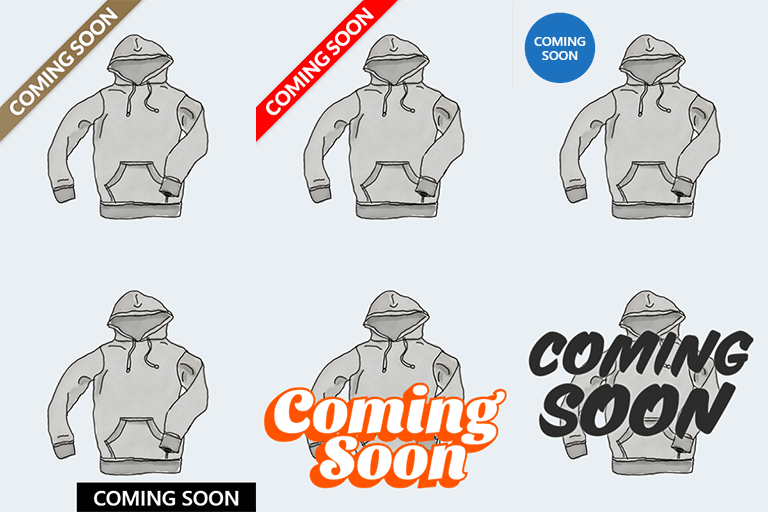
Coming Soon Badges for WooCommerce
by wp-centrics 5 (4 reviews)

Coming Soon Badges for WooCommerce

Show a Coming Soon badge on WooCommerce products. Highly customisable, set it on the product loops and on the product page.

Compatible with WP 6.9.4
v1.1.3 Current Version v1.1.3
Updated 3 weeks ago Last Update on 24 Mar, 2026
Refreshed 6 hours ago Last Refreshed on
Rank
#5,621
No change
Active Installs
1K+
No change
KW Avg Position
116.8
-0.2 better
Downloads
32K
+2 today
Support Resolved
0%
No change
Rating
100%
Review 5 out of 5
5 (4 reviews)

Next Milestone 2K

Total Progress 83.7%
1K+ 2K+
318
Ranks to Climb
-
Growth Needed
8,000,000
Active Installs
Pro

Unlock Exact Install Count

See the precise estimated active installs for this plugin, calculated from real-time ranking data.

  • Exact install estimates within tiers
  • Track install growth over time
  • Milestone progress predictions
Upgrade to Pro
Need 163 more installs to reach 2K+

Rank Changes

5,332 5,475 5,617 5,759 5,902 10-04-2026 11-04-2026 12-04-2026 13-04-2026 14-04-2026 15-04-2026 16-04-2026 17-04-2026
5,608 5,618 5,627 5,637 5,646 02-04-2026 03-04-2026 04-04-2026 05-04-2026 06-04-2026 07-04-2026 08-04-2026 09-04-2026 10-04-2026 11-04-2026 12-04-2026 13-04-2026 14-04-2026 15-04-2026 16-04-2026 17-04-2026
5,607 5,620 5,633 5,645 5,658 18-03-2026 19-03-2026 20-03-2026 21-03-2026 22-03-2026 23-03-2026 24-03-2026 25-03-2026 26-03-2026 27-03-2026 28-03-2026 29-03-2026 30-03-2026 31-03-2026 01-04-2026 02-04-2026 03-04-2026 04-04-2026 05-04-2026 06-04-2026 07-04-2026 08-04-2026 09-04-2026 10-04-2026 11-04-2026 12-04-2026 13-04-2026 14-04-2026 15-04-2026 16-04-2026 17-04-2026
5,519 5,556 5,594 5,632 5,669 17-01-2026 18-01-2026 19-01-2026 20-01-2026 21-01-2026 22-01-2026 23-01-2026 24-01-2026 25-01-2026 26-01-2026 27-01-2026 28-01-2026 29-01-2026 30-01-2026 31-01-2026 01-02-2026 02-02-2026 03-02-2026 04-02-2026 05-02-2026 06-02-2026 07-02-2026 08-02-2026 09-02-2026 10-02-2026 11-02-2026 12-02-2026 13-02-2026 14-02-2026 15-02-2026 16-02-2026 17-02-2026 18-02-2026 19-02-2026 20-02-2026 21-02-2026 22-02-2026 23-02-2026 24-02-2026 25-02-2026 26-02-2026 27-02-2026 28-02-2026 01-03-2026 02-03-2026 03-03-2026 04-03-2026 05-03-2026 06-03-2026 07-03-2026 08-03-2026 09-03-2026 10-03-2026 11-03-2026 12-03-2026 13-03-2026 14-03-2026 15-03-2026 16-03-2026 17-03-2026 18-03-2026 19-03-2026 20-03-2026 21-03-2026 22-03-2026 23-03-2026 24-03-2026 25-03-2026 26-03-2026 27-03-2026 28-03-2026 29-03-2026 30-03-2026 31-03-2026 01-04-2026 02-04-2026 03-04-2026 04-04-2026 05-04-2026 06-04-2026 07-04-2026 08-04-2026 09-04-2026 10-04-2026 11-04-2026 12-04-2026 13-04-2026 14-04-2026 15-04-2026 16-04-2026 17-04-2026
Current #5,621
Change
Best #

Upgrade to Pro

Unlock 30-day and 90-day rank history charts with a Pro subscription.

Upgrade Now

Active Installs Growth

Active Installs 0,000,000+
Growth +0.0%
Peak 0,000,000

Downloads Growth

0 10 20 10-04-2026 11-04-2026 12-04-2026 13-04-2026 14-04-2026 15-04-2026 16-04-2026 17-04-2026
0 10 20 30 02-04-2026 03-04-2026 04-04-2026 05-04-2026 06-04-2026 07-04-2026 08-04-2026 09-04-2026 10-04-2026 11-04-2026 12-04-2026 13-04-2026 14-04-2026 15-04-2026 16-04-2026 17-04-2026
0 100 200 300 400 500 600 18-03-2026 19-03-2026 20-03-2026 21-03-2026 22-03-2026 23-03-2026 24-03-2026 25-03-2026 26-03-2026 27-03-2026 28-03-2026 29-03-2026 30-03-2026 31-03-2026 01-04-2026 02-04-2026 03-04-2026 04-04-2026 05-04-2026 06-04-2026 07-04-2026 08-04-2026 09-04-2026 10-04-2026 11-04-2026 12-04-2026 13-04-2026 14-04-2026 15-04-2026 16-04-2026 17-04-2026
0 200 400 600 800 17-01-2026 20-01-2026 23-01-2026 26-01-2026 29-01-2026 01-02-2026 04-02-2026 07-02-2026 10-02-2026 13-02-2026 16-02-2026 19-02-2026 22-02-2026 25-02-2026 28-02-2026 03-03-2026 06-03-2026 09-03-2026 12-03-2026 15-03-2026 18-03-2026 21-03-2026 24-03-2026 27-03-2026 30-03-2026 02-04-2026 05-04-2026 08-04-2026 11-04-2026 14-04-2026 17-04-2026
0 200 400 600 800 17-04-2025 29-04-2025 11-05-2025 23-05-2025 04-06-2025 16-06-2025 28-06-2025 10-07-2025 22-07-2025 03-08-2025 15-08-2025 27-08-2025 08-09-2025 20-09-2025 02-10-2025 14-10-2025 26-10-2025 07-11-2025 19-11-2025 01-12-2025 13-12-2025 25-12-2025 06-01-2026 18-01-2026 30-01-2026 11-02-2026 23-02-2026 07-03-2026 19-03-2026 31-03-2026 12-04-2026 17-04-2026
Downloads
Growth
Peak

Upgrade to Pro

Unlock 30-day, 90-day, and yearly download history charts with a Pro subscription.

Upgrade Now

Reviews & Ratings

5.0
4 reviews
Overall 100%
5
4 (100%)
4
0 (0%)
3
0 (0%)
2
0 (0%)
1
0 (0%)

Tracked Keywords

Showing 4 of 4
Keyword Position Change Type Updated
Woocommerce badge 101 Tag 1 day ago
product badge 110 Tag 1 day ago
badge 116 Tag 1 day ago
coming soon 140 Tag 1 day ago

Unlock Keyword Analytics

Track keyword rankings, search positions, and discover new ranking opportunities with a Pro subscription.

  • Full keyword position tracking
  • Historical ranking data
  • Competitor keyword analysis
Upgrade to Pro

Track This Plugin

Get detailed analytics, keyword tracking, and position alerts delivered to your inbox.

Start Tracking Free

Plugin Details

Version
1.1.3
Last Updated
Mar 24, 2026
Requires WP
4.7+
Tested Up To
6.9.4
PHP Version
7.0 or higher
Author
wp-centrics

Support & Rating

Rating
★ ★ ★ ★ ★ 5
Reviews
4
Support Threads
0
Resolved
0%

Keywords

Upgrade to Pro

Unlock keyword rankings, search positions, and detailed analytics with a Pro subscription.

Upgrade Now

Frequently Asked Questions

Common questions about Coming Soon Badges for WooCommerce

On the admin side, go to WooCommerce > Coming Soon Badges
The plugin doesn’t do this yet. There are two ways in WooCommerce to prevent a product from being purchased: You can remove the regular and sale price for a product, or You can set the product stock to 0, or the stock status to out of stock (if you haven't set the WooCommerce product setting "Hide out of stock items from catalog", otherwise product will be hidden)
Open a product for editing and activate the checkbox labeled "Show Coming Soon badge", located just below the publication date. Then save the product.
We can’t be 100% sure, but the plugin was coded following the standard WooCommerce template system and should work well with any theme. In any case, it was designed carefully to ensure it doesn’t break the layout if it isn’t fully compatible. Please write to us on the support forum to let us know whether the plugin works well with your theme or not. Your feedback will help us and other users, and we will try to make it work for you if it doesn’t.
Coming Soon for WooCommerce works with the actions found in the standard product loop and single product templates. The used actions to print the badge code are: For single product: do_action( 'woocommerce_before_template_part' ); For product loop: do_action( 'woocommerce_shop_loop_item_title' ); You can find this actions in the templates: wp-content/plugins/woocommerce/templates/single-product.php (single product template) wp-content/plugins/woocommerce/templates/content-product.php (print each product on loop) ...if you want to override these files in your WooCommerce child theme, or if you’re coding a theme from scratch, you may have the same file names in your theme folder: wp-content/themes/your-theme/woocommerce/content-product.php wp-content/themes/your-theme/woocommerce/single-product.php in this case, simply check you've this actions on your code: For single product: do_action( 'woocommerce_after_main_content' ); For product loop: do_action( 'woocommerce_shop_loop_item_title' ); ...and Coming Soon for WooCommerce will do the rest :)
First, ensure you're logged as admin, otherwise the plugin will not show any information. Then add this parameter to the end of any page URL: ?coming-soon-wc=1 In this way: www.mywebsite.com/?coming-soon-wc=1 Look into the code for: log info The badge preview is not exactly the same as the badge on the front end The plugin can't guess your theme font-family or product thumbnail size, so maybe you should adjust a bit the text and badge size.

Sign In / Register

You need to sign in or register to use this feature.