CoolClock - a Javascript Analog Clock
by RavanH 4.9 (15 reviews)

CoolClock - a Javascript Analog Clock

Show an analog clock on your WordPress site sidebar or in post and page content.

Tested up to WP 6.3 (Current: 6.9)
vtrunk Current Version vtrunk
Updated 2 years ago Last Update on 04 Oct, 2023
Synced 17 hours ago Last Synced on
Rank
#5,081
No change
Active Installs
2K+
-15.7%
KW Avg Position
38.7
-0.3 better
Downloads
86.9K
+5 today
Support Resolved
0%
No change
Rating
98%
Review 4.9 out of 5
4.9 (15 reviews)

Next Milestone 3K

Total Progress 31.2%
2K+ 3K+
663
Ranks to Climb
-
Growth Needed
8,000,000
Active Installs
Pro

Unlock Exact Install Count

See the precise estimated active installs for this plugin, calculated from real-time ranking data.

  • Exact install estimates within tiers
  • Track install growth over time
  • Milestone progress predictions
Upgrade to Pro
Need 688 more installs to reach 3K+

Rank Changes

5,067 5,073 5,079 5,084 5,090 14-01-2026 15-01-2026 16-01-2026 17-01-2026 18-01-2026 19-01-2026 20-01-2026 21-01-2026
5,063 5,070 5,077 5,083 5,090 06-01-2026 07-01-2026 08-01-2026 09-01-2026 10-01-2026 11-01-2026 12-01-2026 13-01-2026 14-01-2026 15-01-2026 16-01-2026 17-01-2026 18-01-2026 19-01-2026 20-01-2026 21-01-2026
5,041 5,054 5,066 5,078 5,091 22-12-2025 23-12-2025 24-12-2025 25-12-2025 26-12-2025 27-12-2025 28-12-2025 29-12-2025 30-12-2025 31-12-2025 01-01-2026 02-01-2026 03-01-2026 04-01-2026 05-01-2026 06-01-2026 07-01-2026 08-01-2026 09-01-2026 10-01-2026 11-01-2026 12-01-2026 13-01-2026 14-01-2026 15-01-2026 16-01-2026 17-01-2026 18-01-2026 19-01-2026 20-01-2026 21-01-2026
5,041 5,054 5,066 5,078 5,091 23-10-2025 24-10-2025 25-10-2025 26-10-2025 27-10-2025 28-10-2025 29-10-2025 30-10-2025 31-10-2025 01-11-2025 02-11-2025 03-11-2025 04-11-2025 05-11-2025 06-11-2025 07-11-2025 08-11-2025 09-11-2025 10-11-2025 11-11-2025 12-11-2025 13-11-2025 14-11-2025 15-11-2025 16-11-2025 17-11-2025 18-11-2025 19-11-2025 20-11-2025 21-11-2025 22-11-2025 23-11-2025 24-11-2025 25-11-2025 26-11-2025 27-11-2025 28-11-2025 29-11-2025 30-11-2025 01-12-2025 02-12-2025 03-12-2025 04-12-2025 05-12-2025 06-12-2025 07-12-2025 08-12-2025 09-12-2025 10-12-2025 11-12-2025 12-12-2025 13-12-2025 14-12-2025 15-12-2025 16-12-2025 17-12-2025 18-12-2025 19-12-2025 20-12-2025 21-12-2025 22-12-2025 23-12-2025 24-12-2025 25-12-2025 26-12-2025 27-12-2025 28-12-2025 29-12-2025 30-12-2025 31-12-2025 01-01-2026 02-01-2026 03-01-2026 04-01-2026 05-01-2026 06-01-2026 07-01-2026 08-01-2026 09-01-2026 10-01-2026 11-01-2026 12-01-2026 13-01-2026 14-01-2026 15-01-2026 16-01-2026 17-01-2026 18-01-2026 19-01-2026 20-01-2026 21-01-2026
Current #5,081
Change
Best #

Upgrade to Pro

Unlock 30-day and 90-day rank history charts with a Pro subscription.

Upgrade Now

Active Installs Growth

Active Installs 0,000,000+
Growth +0.0%
Peak 0,000,000

Downloads Growth

0 10 14-01-2026 15-01-2026 16-01-2026 17-01-2026 18-01-2026 19-01-2026 20-01-2026 21-01-2026
0 10 06-01-2026 07-01-2026 08-01-2026 09-01-2026 10-01-2026 11-01-2026 12-01-2026 13-01-2026 14-01-2026 15-01-2026 16-01-2026 17-01-2026 18-01-2026 19-01-2026 20-01-2026 21-01-2026
0 10 22-12-2025 23-12-2025 24-12-2025 25-12-2025 26-12-2025 27-12-2025 28-12-2025 29-12-2025 30-12-2025 31-12-2025 01-01-2026 02-01-2026 03-01-2026 04-01-2026 05-01-2026 06-01-2026 07-01-2026 08-01-2026 09-01-2026 10-01-2026 11-01-2026 12-01-2026 13-01-2026 14-01-2026 15-01-2026 16-01-2026 17-01-2026 18-01-2026 19-01-2026 20-01-2026 21-01-2026
0 10 20 23-10-2025 26-10-2025 29-10-2025 01-11-2025 04-11-2025 07-11-2025 10-11-2025 13-11-2025 16-11-2025 19-11-2025 22-11-2025 25-11-2025 28-11-2025 01-12-2025 04-12-2025 07-12-2025 10-12-2025 13-12-2025 16-12-2025 19-12-2025 22-12-2025 25-12-2025 28-12-2025 31-12-2025 03-01-2026 06-01-2026 09-01-2026 12-01-2026 15-01-2026 18-01-2026 21-01-2026
0 10 20 21-01-2025 02-02-2025 14-02-2025 26-02-2025 10-03-2025 22-03-2025 03-04-2025 15-04-2025 27-04-2025 09-05-2025 21-05-2025 02-06-2025 14-06-2025 26-06-2025 08-07-2025 20-07-2025 01-08-2025 13-08-2025 25-08-2025 06-09-2025 18-09-2025 30-09-2025 12-10-2025 24-10-2025 05-11-2025 17-11-2025 29-11-2025 11-12-2025 23-12-2025 04-01-2026 16-01-2026 21-01-2026
Downloads
Growth
Peak

Upgrade to Pro

Unlock 30-day, 90-day, and yearly download history charts with a Pro subscription.

Upgrade Now

Reviews & Ratings

4.9
15 reviews
Overall 98%
5
14 (93%)
4
1 (7%)
3
0 (0%)
2
0 (0%)
1
0 (0%)

Tracked Keywords

Showing 3 of 3
Keyword Position Change Type Updated
coolclock 1 Tag 17 hours ago
analog clock 11 Tag 17 hours ago
clock 104 Tag 17 hours ago

Unlock Keyword Analytics

Track keyword rankings, search positions, and discover new ranking opportunities with a Pro subscription.

  • Full keyword position tracking
  • Historical ranking data
  • Competitor keyword analysis
Upgrade to Pro

Track This Plugin

Get detailed analytics, keyword tracking, and position alerts delivered to your inbox.

Start Tracking Free

Plugin Details

Version
trunk
Last Updated
Oct 04, 2023
Requires WP
4.8.1+
Tested Up To
6.3
PHP Version
5.6 or higher
Author
RavanH

Support & Rating

Rating
★ ★ ★ ★ ★ 4.9
Reviews
15
Support Threads
0
Resolved
0%

Keywords

Upgrade to Pro

Unlock keyword rankings, search positions, and detailed analytics with a Pro subscription.

Upgrade Now

Frequently Asked Questions

Common questions about CoolClock - a Javascript Analog Clock

There is no options page. Just go to your Appearance > Widgets admin page and find the new Analog Clock widget. Add it to your sidebar and change settings if you want to see another than the default clock. Other ways to integrate a clock into your site are shortcodes or a theme function. See instructions below.
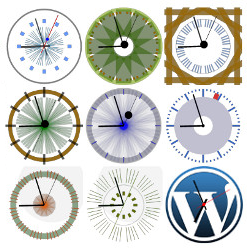
First of all, you can pick a preset skin. There are 21 skins made by other users and, when the Advanced extension is added, one Minimal skin that only shows the clock arms, that can be useful for placing over a custom background image. There are these options: Custom skin parameters - see question below; Radius - changes the clock size; Hide second hand; Show digital time (more options in the Advanced version); Set digital time color; GMT Offset - use this if you want one or more clocks to show the time for other timezones; Scale - linear is our standard clock scale, the other two show a logarithmic time scale; Align - left, center or right; Subtext - optional text, centered below the clock. Then there are extra options availabe in the CoolClock - Advanced extension which allow for more customisation: Background image - define the full URL or path to an image to serve as background; Repeat image; Background size - stretch or cover to make it match your clock size; Background position - center, top, right, bottom or left of the wrapping div (define div size below); Width and height - define the size of the wrapping div that holds the background image; Background color - define a color value in hex or rgb(a) format, or a css color name; Border radius - optional rounded corners, higher is rounder; Clock position relative to background - here you can position the clock relative to top and left border of the wrapping div (as defined above) that holds the background image. Custom skin parameters for shortcode
Follow the steps on Creating a Custom Skin and if you are happy with the result, please consider sharing it with other users!
If you made a nice skin and would like to share it, you can do so in the comments on Creating a Custom Skin or add it to your Plugin Review. Thanks for sharing! :)
Yes, there the shortcode [coolclock /] available. You can find all parameters on How to use the CoolClock shortcode.
Yes, you can use a built-in WordPress function that parses a shortcode. To place the same clock as in the shortcode example above, anywhere in your theme, use this: <?php echo do_shortcode('[coolclock skin="chunkySwiss" radius="140" showdigital=true align="left" /]'); ?>

Sign In / Register

You need to sign in or register to use this feature.