DestinX Product Configurator for WooCommerce
by destinx 5 (1 reviews)

DestinX Product Configurator for WooCommerce

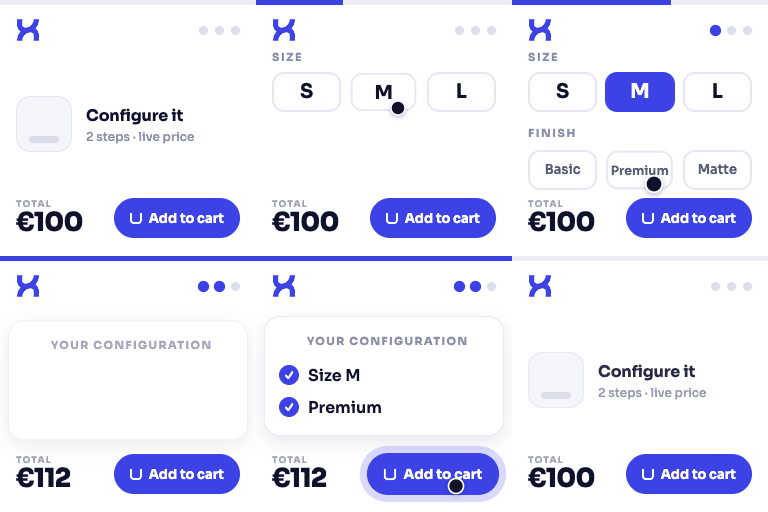
Build guided WooCommerce product configuration flows with reusable templates, option groups, and a live configuration recap.

DestinX Product Configurator for WooCommerce ranks #57,209 among WordPress.org plugins with 0+ active installations, is #10,113 of 14,124 in the E-commerce category, a 5/5 rating from 1 reviews, and was last updated Oct 28, 2026. Data from WordPress.org, refreshed twice daily — see methodology.

Compatible with WP 7.1.4
v0.9.28.5 Current Version v0.9.28.5
Updated 1 week ago Last Update on 28 Oct, 2026
Refreshed 1 week ago Last Refreshed on
#10,113 of 14,124 in E-commerce Downloads -81.8% this week Actively maintained
View on WordPress.org
Rank
#57,209
— No change
Active Installs
0+
-100%
KW Avg Position
26
0.5 worse
Downloads
658
+4 today
Support Resolved
100%
— No change
Rating
100%
Review 5 out of 5
5 (1 reviews)

Next Milestone 10

Total Progress 30%
0+ 10+
29,641
Ranks to Climb
-
Growth Needed
8,000,000
Active Installs
Pro

Unlock Exact Install Count

See the precise estimated active installs for this plugin, calculated from real-time ranking data.

  • Exact install estimates within tiers
  • Track install growth over time
  • Milestone progress predictions
Upgrade to Pro
Need 7 more installs to reach 10+

Rank Changes

54,349 55,779 57,209 58,639 60,069 30-10-2026 31-10-2026 01-11-2026 02-11-2026 03-11-2026 04-11-2026 05-11-2026 06-11-2026
53,866 58,988 64,110 69,232 74,354 22-10-2026 23-10-2026 24-10-2026 25-10-2026 26-10-2026 27-10-2026 28-10-2026 29-10-2026 30-10-2026 31-10-2026 01-11-2026 02-11-2026 03-11-2026 04-11-2026 05-11-2026 06-11-2026
Current #57,209
Change
Best #

Upgrade to Pro

Unlock 30-day and 90-day rank history charts with a Pro subscription.

Upgrade Now

Active Installs Growth

Active Installs 0,000,000+
Growth +0.0%
Peak 0,000,000

Downloads Growth

0 10 20 30-10-2026 31-10-2026 01-11-2026 02-11-2026 03-11-2026 04-11-2026 05-11-2026 06-11-2026
0 10 20 30 40 50 60 22-10-2026 23-10-2026 24-10-2026 25-10-2026 26-10-2026 27-10-2026 28-10-2026 29-10-2026 30-10-2026 31-10-2026 01-11-2026 02-11-2026 03-11-2026 04-11-2026 05-11-2026 06-11-2026
Downloads
Growth
Peak

Upgrade to Pro

Unlock 30-day, 90-day, and yearly download history charts with a Pro subscription.

Upgrade Now

Reviews & Ratings

5.0
1 reviews
Overall 100%
5
1 (100%)
4
0 (0%)
3
0 (0%)
2
0 (0%)
1
0 (0%)

Support Threads Overview

Resolved
Unresolved
1
Total Threads
1
Resolved
0
Unresolved
100%
Resolution Rate

Frequently Asked Questions

Common questions about DestinX Product Configurator for WooCommerce

In Options > General, Automatic hook render inserts the assigned active template on standard WooCommerce and Elementor Pro Single Product pages. Shortcode only requires a [destinxpc_configurator] shortcode in the product or builder template; assigning a template alone does not insert it. AUTO compatibility avoids duplicates when it detects an explicit shortcode, and does not replace your saved insertion choice.
Authorized store managers can use Preview configurator (read only) from Assignments or the product editor. The user-bound preview supports selections and price estimates without publishing the product or changing insertion settings. Cart, uploads, saving and sharing are disabled in preview. Public endpoints continue to reject restricted products. A normal storefront page requires a published, accessible product and the correct automatic or shortcode placement.
Yes. It extends WooCommerce product pages and requires WooCommerce to be active.
Yes. Every feature included in this WordPress.org package is available immediately after activation. There are no license checks or locked controls.
The WooCommerce product price is used as the base. Any price adjustments assigned to the selected options are added per product quantity.
No. It does not send store data to Destinx for licensing, updates, telemetry, or font loading.
Open Options > Layout, select Minimal, and choose the image source under Minimal product images. WooCommerce product gallery keeps the product images and thumbnails. Selected option image displays the last selected option that has a valid image, falling back to another selected image or the product image when needed. Existing installations keep their current layout and the gallery is the default image source.
This package does not include matrix pricing, CSV price imports, conditional field filters, quote/PDF workflows, or production worksheets. There are no locked controls or license checks for these implementations in the WordPress.org package.

Sign In / Register

You need to sign in or register to use this feature.






