by George Cooke
1 (0 reviews)
Faculty Weekly Schedule
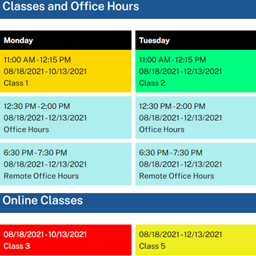
Define and display the weekly schedule of a faculty member.
Tested up to WP 5.9 (Current: 6.9)
v1.2.0
Current Version v1.2.0
Updated 3 years ago
Last Update on 14 Mar, 2022
Synced 13 hours ago
Last Synced on
Rank
#26,581
—
No change
Active Installs
20+
-16.7%
KW Avg Position
88.5
-0.5 better
Downloads
1.2K
+1 today
Support Resolved
0%
—
No change
Rating
20%
Review 1 out of 5
1
(0 reviews)
Next Milestone 30
20+
30+
4,677
Ranks to Climb
-
Growth Needed
8,000,000
Active Installs
Pro
Unlock Exact Install Count
See the precise estimated active installs for this plugin, calculated from real-time ranking data.
- Exact install estimates within tiers
- Track install growth over time
- Milestone progress predictions
Need 4 more installs to reach 30+
Rank Changes
Current
#26,581
Change
Best
#
Downloads Growth
Downloads
Growth
Peak
Upgrade to Pro
Unlock 30-day, 90-day, and yearly download history charts with a Pro subscription.
Upgrade NowReviews & Ratings
1.0
0 reviews
Overall
20%
5
0
(0%)
4
0
(0%)
3
0
(0%)
2
0
(0%)
1
0
(0%)
Tracked Keywords
Showing 2 of 2Unlock Keyword Analytics
Track keyword rankings, search positions, and discover new ranking opportunities with a Pro subscription.
- Full keyword position tracking
- Historical ranking data
- Competitor keyword analysis
Track This Plugin
Get detailed analytics, keyword tracking, and position alerts delivered to your inbox.
Start Tracking FreePlugin Details
- Version
- 1.2.0
- Last Updated
- Mar 14, 2022
- Requires WP
- 5.0+
- Tested Up To
- 5.9
- PHP Version
- 7.3 or higher
- Author
- George Cooke
Support & Rating
- Rating
- ★ ☆ ☆ ☆ ☆ 1
- Reviews
- 0
- Support Threads
- 0
- Resolved
- 0%
Keywords
Upgrade to Pro
Unlock keyword rankings, search positions, and detailed analytics with a Pro subscription.
Upgrade NowSimilar Plugins

WP Adminify – White Label WordPress, Admin Menu Editor, Login Customizer
7K+ installs
#2,736
Master Addons For Elementor - White Label, Free Widgets, Hover Effects, Conditions, & Animations
40K+ installs
#929
Popup Builder - Create highly converting, mobile friendly marketing popups.
200K+ installs
#259
پارسی دیت – Parsi Date
100K+ installs
#346
LatePoint - Calendar Booking Plugin for Appointments and Events
100K+ installs
#391
Frequently Asked Questions
Common questions about Faculty Weekly Schedule
For each start and end date period, add a new schedule with the appropriate office hours and classes for that date period. Then use the shortcode include attribute to have the appropriate schedule shown for the current date.
Either add a separate office hours block with a different block title and background color for each advising time block or add a new schedule with the same start and end dates as the regular office hours and classes schedule with the advising time blocks.
Yes. Each site in a multisite will have separate settings and schedules.
No. All schedule settings and all schedules added will be kept. On a multisite all schedule settings and all schedules added will be kept on all sites within the multisite network.
Yes. All schedule settings and all schedules added will be deleted. On a multisite all schedule settings and all schedules added will be deleted from all sites within the multisite network.










