World Clock
by enclick 1.7 (3 reviews)

World Clock

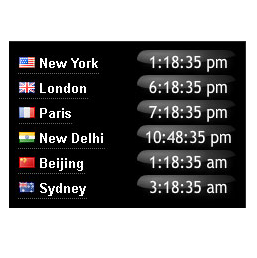
World clock showing the local time at six major cities round the world. The plugin provides a choice of analog and digital clocks, colors and sizes.

World Clock ranks #13,152 among WordPress.org plugins with 100+ active installations, a 1.7/5 rating from 3 reviews, and was last updated Aug 23, 2022. Data from WordPress.org, refreshed twice daily — see methodology.

Tested up to WP 6.0.14 (Current: 7.1)
v1.1 Current Version v1.1
Updated 4 years ago Last Update on 23 Aug, 2022
Refreshed 6 hours ago Last Refreshed on
Top 25% by installs No update in over a year
View on WordPress.org
Rank
#13,152
No change
Active Installs
100+
-49.7%
KW Avg Position
11.3
No change
Downloads
30.4K
+2 today
Support Resolved
0%
No change
Rating
34%
Review 1.7 out of 5
1.7 (3 reviews)

Next Milestone 200

Total Progress 97%
100+ 200+
95
Ranks to Climb
-
Growth Needed
8,000,000
Active Installs
Pro

Unlock Exact Install Count

See the precise estimated active installs for this plugin, calculated from real-time ranking data.

  • Exact install estimates within tiers
  • Track install growth over time
  • Milestone progress predictions
Upgrade to Pro
Need 3 more installs to reach 200+

Rank Changes

13,086 13,109 13,133 13,156 13,179 10-09-2026 11-09-2026 12-09-2026 13-09-2026 14-09-2026 15-09-2026 16-09-2026 17-09-2026
13,062 13,092 13,122 13,152 13,182 02-09-2026 03-09-2026 04-09-2026 05-09-2026 06-09-2026 07-09-2026 08-09-2026 09-09-2026 10-09-2026 11-09-2026 12-09-2026 13-09-2026 14-09-2026 15-09-2026 16-09-2026 17-09-2026
Current #13,152
Change
Best #

Upgrade to Pro

Unlock 30-day and 90-day rank history charts with a Pro subscription.

Upgrade Now

Active Installs Growth

Active Installs 0,000,000+
Growth +0.0%
Peak 0,000,000

Downloads Growth

0 10 20 10-09-2026 11-09-2026 12-09-2026 13-09-2026 14-09-2026 15-09-2026 16-09-2026 17-09-2026
0 10 20 02-09-2026 03-09-2026 04-09-2026 05-09-2026 06-09-2026 07-09-2026 08-09-2026 09-09-2026 10-09-2026 11-09-2026 12-09-2026 13-09-2026 14-09-2026 15-09-2026 16-09-2026 17-09-2026
Downloads
Growth
Peak

Upgrade to Pro

Unlock 30-day, 90-day, and yearly download history charts with a Pro subscription.

Upgrade Now

Reviews & Ratings

1.7
3 reviews
Overall 34%
5
0 (0%)
4
0 (0%)
3
1 (33%)
2
0 (0%)
1
2 (67%)

Security History

Source: WPVulnerability

No known vulnerabilities on record for World Clock. Checked 1 month ago.

Track This Plugin

Get detailed analytics, keyword tracking, and position alerts delivered to your inbox.

Start Tracking Free

Plugin Details

Version
1.1
Last Updated
Aug 23, 2022
Requires WP
2.8+
Tested Up To
6.0.14
PHP Version
N/A
Author
enclick

Support & Rating

Rating
★ ★ ☆ ☆ ☆ 1.7
Reviews
3
Support Threads
0
Resolved
0%

Keywords

Upgrade to Pro

Unlock keyword rankings, search positions, and detailed analytics with a Pro subscription.

Upgrade Now


TL;DR

AI summary of the plugin's readme

This plugin is for WordPress site owners who want to display international time zones on their site. It solves the problem of showing visitors the local time in six major world cities using customizable analog or digital clocks.

  • Analog or digital clocks
  • Three groups of world capitals
  • Horizontal or vertical clock format
  • Color selection for text and background
  • Automatic daylight saving time adjustment

Frequently Asked Questions

Common questions about World Clock

Go to the Appearance->Widgets tab in your wordpress admin panel, and choose click on settings for the local time clock, select text, border and background colors from the drop downs
Yes, the javascript is available directly from localtimes.info/world. You must paste your clock's javascript into the post in HTML mode.
Yes, the clock automatically changes for all Daylight Saving Time changes in the world, using the localtimes.info database.
Daylight saving time is the convention of advancing clocks so that afternoons have more daylight and mornings have less. Click here for more information
Further support is available at localtimes.info/support, or localtimes.info/conditions Contact Email us at widgets at localtimes.info or send us a message on twitter.com/localtimes

More plugins by enclick

Sign In / Register

You need to sign in or register to use this feature.