by 56 Degrees
1 (0 reviews)
Events: Calendar, Boxes, and List
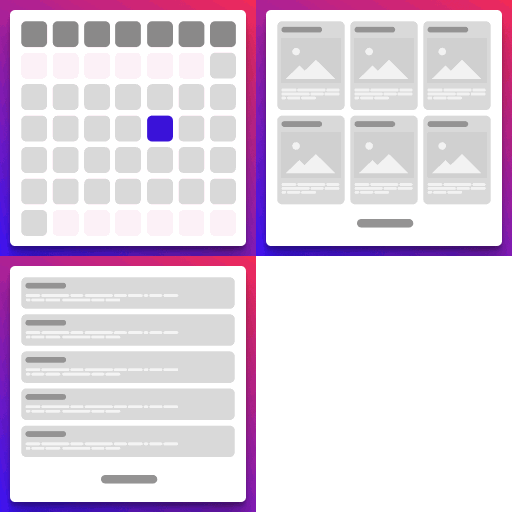
A simple and powerful events manager plugin with multiple views: calendar, boxes, and list.
Tested up to WP 6.7 (Current: 6.9)
v1.1.1
Current Version v1.1.1
Updated 11 months ago
Last Update on 19 Feb, 2025
Synced 13 hours ago
Last Synced on
Rank
#44,984
+8684 this week
Active Installs
1+
—
No change
KW Avg Position
96
—
No change
Downloads
577
—
Total downloads
Support Resolved
0%
—
No change
Rating
20%
Review 1 out of 5
1
(0 reviews)
Next Milestone 10
0+
10+
35,466
Ranks to Climb
-
Growth Needed
8,000,000
Active Installs
Pro
Unlock Exact Install Count
See the precise estimated active installs for this plugin, calculated from real-time ranking data.
- Exact install estimates within tiers
- Track install growth over time
- Milestone progress predictions
Need 7 more installs to reach 10+
Rank Changes
Current
#44,984
Change
Best
#
Downloads Growth
Downloads
Growth
Peak
Upgrade to Pro
Unlock 30-day, 90-day, and yearly download history charts with a Pro subscription.
Upgrade NowReviews & Ratings
1.0
0 reviews
Overall
20%
5
0
(0%)
4
0
(0%)
3
0
(0%)
2
0
(0%)
1
0
(0%)
Tracked Keywords
Showing 1 of 1| Keyword | Position | Change | Type | Updated |
|---|---|---|---|---|
| organizer | 96 | — | Tag | 16 hours ago |
Unlock Keyword Analytics
Track keyword rankings, search positions, and discover new ranking opportunities with a Pro subscription.
- Full keyword position tracking
- Historical ranking data
- Competitor keyword analysis
Track This Plugin
Get detailed analytics, keyword tracking, and position alerts delivered to your inbox.
Start Tracking FreePlugin Details
- Version
- 1.1.1
- Last Updated
- Feb 19, 2025
- Requires WP
- 6.7.2+
- Tested Up To
- 6.7
- PHP Version
- 7.4 or higher
- Author
- 56 Degrees
Support & Rating
- Rating
- ★ ☆ ☆ ☆ ☆ 1
- Reviews
- 0
- Support Threads
- 0
- Resolved
- 0%
Keywords
Upgrade to Pro
Unlock keyword rankings, search positions, and detailed analytics with a Pro subscription.
Upgrade NowSimilar Plugins

WP Adminify – White Label WordPress, Admin Menu Editor, Login Customizer
7K+ installs
#2,735
Master Addons For Elementor - White Label, Free Widgets, Hover Effects, Conditions, & Animations
40K+ installs
#929
Popup Builder - Create highly converting, mobile friendly marketing popups.
200K+ installs
#259
پارسی دیت – Parsi Date
100K+ installs
#345
LatePoint - Calendar Booking Plugin for Appointments and Events
100K+ installs
#391
Frequently Asked Questions
Common questions about Events: Calendar, Boxes, and List
Go to the 'Events' section in your WordPress dashboard, click 'Add New', and fill in the event details.
Yes, you can customize the calendar, boxes, and list views by adjusting the plugin settings or adding custom CSS.
To resolve the 404 error when accessing a single event page, please follow these steps to refresh your permalinks: 1.Navigate to your WordPress dashboard. 2.Go to Settings > Permalinks. 3.Without making any changes, click the Save Changes button. This action will regenerate your permalink structure and should resolve the 404 error.
If you’ve updated your color theme but the changes aren’t visible on the frontend, please try clearing your cache to see if that helps. Available shortcodes [fsdpe_events_calendar] displays the calendar view, list, and card layouts. Use [fsdpe_events_calendar show-cards="false"] to hide the card view; by default, this is set to true. The show-calendar option controls the visibility of the calendar view, while show-cards controls the visibility of the card view. The show-list option determines the visibility of the list view. You can set the number of events displayed in the card and list views using the events-per-page option, which defaults to 5. Example: [fsdpe_events_calendar show-list="false" events-per-page="10"] - this will display only Calendar and Cards view with 10 events per page. For adding events to your calendar, [fsdpe_add_to_calendar] displays the event details on the single event page, including an image and the "Add to Calendar" button. You can also specify an event ID with [fsdpe_add_to_calendar id="1346"] to display a specific event in any location.










