GDPR Notice
by orcas 5 (2 reviews)

GDPR Notice

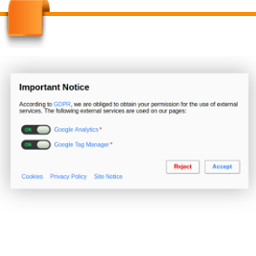
GDPR Notice allows you, in accordance to the General Data Protection Regulation, to ask the user in advance if your page may use external services.

Tested up to WP 5 (Current: 6.9)
v1.3.13 Current Version v1.3.13
Updated 7 years ago Last Update on 14 Jan, 2019
Synced 13 hours ago Last Synced on
Rank
#24,443
No change
Active Installs
30+
-9.1%
KW Avg Position
91
+0.3 better
Downloads
3.7K
+1 today
Support Resolved
0%
No change
Rating
100%
Review 5 out of 5
5 (2 reviews)

Next Milestone 40

Total Progress 20%
30+ 40+
2,068
Ranks to Climb
-
Growth Needed
8,000,000
Active Installs
Pro

Unlock Exact Install Count

See the precise estimated active installs for this plugin, calculated from real-time ranking data.

  • Exact install estimates within tiers
  • Track install growth over time
  • Milestone progress predictions
Upgrade to Pro
Need 8 more installs to reach 40+

Rank Changes

24,238 24,337 24,437 24,536 24,635 13-01-2026 14-01-2026 15-01-2026 16-01-2026 17-01-2026 18-01-2026 19-01-2026 20-01-2026
24,201 24,311 24,421 24,530 24,640 05-01-2026 06-01-2026 07-01-2026 08-01-2026 09-01-2026 10-01-2026 11-01-2026 12-01-2026 13-01-2026 14-01-2026 15-01-2026 16-01-2026 17-01-2026 18-01-2026 19-01-2026 20-01-2026
23,425 23,754 24,083 24,412 24,741 21-12-2025 22-12-2025 23-12-2025 24-12-2025 25-12-2025 26-12-2025 27-12-2025 28-12-2025 29-12-2025 30-12-2025 31-12-2025 01-01-2026 02-01-2026 03-01-2026 04-01-2026 05-01-2026 06-01-2026 07-01-2026 08-01-2026 09-01-2026 10-01-2026 11-01-2026 12-01-2026 13-01-2026 14-01-2026 15-01-2026 16-01-2026 17-01-2026 18-01-2026 19-01-2026 20-01-2026
23,425 23,754 24,083 24,412 24,741 22-10-2025 23-10-2025 24-10-2025 25-10-2025 26-10-2025 27-10-2025 28-10-2025 29-10-2025 30-10-2025 31-10-2025 01-11-2025 02-11-2025 03-11-2025 04-11-2025 05-11-2025 06-11-2025 07-11-2025 08-11-2025 09-11-2025 10-11-2025 11-11-2025 12-11-2025 13-11-2025 14-11-2025 15-11-2025 16-11-2025 17-11-2025 18-11-2025 19-11-2025 20-11-2025 21-11-2025 22-11-2025 23-11-2025 24-11-2025 25-11-2025 26-11-2025 27-11-2025 28-11-2025 29-11-2025 30-11-2025 01-12-2025 02-12-2025 03-12-2025 04-12-2025 05-12-2025 06-12-2025 07-12-2025 08-12-2025 09-12-2025 10-12-2025 11-12-2025 12-12-2025 13-12-2025 14-12-2025 15-12-2025 16-12-2025 17-12-2025 18-12-2025 19-12-2025 20-12-2025 21-12-2025 22-12-2025 23-12-2025 24-12-2025 25-12-2025 26-12-2025 27-12-2025 28-12-2025 29-12-2025 30-12-2025 31-12-2025 01-01-2026 02-01-2026 03-01-2026 04-01-2026 05-01-2026 06-01-2026 07-01-2026 08-01-2026 09-01-2026 10-01-2026 11-01-2026 12-01-2026 13-01-2026 14-01-2026 15-01-2026 16-01-2026 17-01-2026 18-01-2026 19-01-2026 20-01-2026
Current #24,443
Change
Best #

Upgrade to Pro

Unlock 30-day and 90-day rank history charts with a Pro subscription.

Upgrade Now

Active Installs Growth

Active Installs 0,000,000+
Growth +0.0%
Peak 0,000,000

Downloads Growth

0 10 13-01-2026 14-01-2026 15-01-2026 16-01-2026 17-01-2026 18-01-2026 19-01-2026 20-01-2026
0 10 05-01-2026 06-01-2026 07-01-2026 08-01-2026 09-01-2026 10-01-2026 11-01-2026 12-01-2026 13-01-2026 14-01-2026 15-01-2026 16-01-2026 17-01-2026 18-01-2026 19-01-2026 20-01-2026
0 10 21-12-2025 22-12-2025 23-12-2025 24-12-2025 25-12-2025 26-12-2025 27-12-2025 28-12-2025 29-12-2025 30-12-2025 31-12-2025 01-01-2026 02-01-2026 03-01-2026 04-01-2026 05-01-2026 06-01-2026 07-01-2026 08-01-2026 09-01-2026 10-01-2026 11-01-2026 12-01-2026 13-01-2026 14-01-2026 15-01-2026 16-01-2026 17-01-2026 18-01-2026 19-01-2026 20-01-2026
0 10 22-10-2025 25-10-2025 28-10-2025 31-10-2025 03-11-2025 06-11-2025 09-11-2025 12-11-2025 15-11-2025 18-11-2025 21-11-2025 24-11-2025 27-11-2025 30-11-2025 03-12-2025 06-12-2025 09-12-2025 12-12-2025 15-12-2025 18-12-2025 21-12-2025 24-12-2025 27-12-2025 30-12-2025 02-01-2026 05-01-2026 08-01-2026 11-01-2026 14-01-2026 17-01-2026 20-01-2026
0 10 20-01-2025 01-02-2025 13-02-2025 25-02-2025 09-03-2025 21-03-2025 02-04-2025 14-04-2025 26-04-2025 08-05-2025 20-05-2025 01-06-2025 13-06-2025 25-06-2025 07-07-2025 19-07-2025 31-07-2025 12-08-2025 24-08-2025 05-09-2025 17-09-2025 29-09-2025 11-10-2025 23-10-2025 04-11-2025 16-11-2025 28-11-2025 10-12-2025 22-12-2025 03-01-2026 15-01-2026 20-01-2026
Downloads
Growth
Peak

Upgrade to Pro

Unlock 30-day, 90-day, and yearly download history charts with a Pro subscription.

Upgrade Now

Reviews & Ratings

5.0
2 reviews
Overall 100%
5
2 (100%)
4
0 (0%)
3
0 (0%)
2
0 (0%)
1
0 (0%)

Tracked Keywords

Showing 3 of 3
Keyword Position Change Type Updated
general data protection regulation 45 Tag 15 hours ago
dsgvo 73 Tag 15 hours ago
law 155 Tag 15 hours ago

Unlock Keyword Analytics

Track keyword rankings, search positions, and discover new ranking opportunities with a Pro subscription.

  • Full keyword position tracking
  • Historical ranking data
  • Competitor keyword analysis
Upgrade to Pro

Track This Plugin

Get detailed analytics, keyword tracking, and position alerts delivered to your inbox.

Start Tracking Free

Plugin Details

Version
1.3.13
Last Updated
Jan 14, 2019
Requires WP
3.4+
Tested Up To
5
PHP Version
5.6 or higher
Author
orcas

Support & Rating

Rating
★ ★ ★ ★ ★ 5
Reviews
2
Support Threads
0
Resolved
0%

Keywords

Upgrade to Pro

Unlock keyword rankings, search positions, and detailed analytics with a Pro subscription.

Upgrade Now

Frequently Asked Questions

Common questions about GDPR Notice

Yes, multiple entries with type title are supported. However, only the highest ranking one (lowest menu order or earliest creation date) will be displayed.
The entries are ordered by their menu order. The lower the menu order, the higher up the entry will be displayed. Entries with the same menu order will be ordered by their creation date.
No, you can create as many entries as you like. I have installed a new plugin I need to inform my users about/My policies have changed
If you only changed something minor, for example you fixed a typo, there is also a checkbox near the update button to to mark the change as minor. If you check this box your users will not need to give their consent again.
Yes, there are two ways for a user to do that. They can either delete the cookies in their browser to revoke all consent. Alternatively, you can add an individual link with it's target URL set to {GDPR_RESELECT} to your menu. This will generate a link the user can use to re-choose their consent.
In some cases, themes or plugins may mess up when adding links to the menu and set the placeholder as the link URL. If this happens to you, you can usually work around this by setting the URL to ?gdpr_reselect=1 instead.

Sign In / Register

You need to sign in or register to use this feature.








