Interactive Image Map Builder
by Mehjabin Orthi 5 (17 reviews)

Interactive Image Map Builder

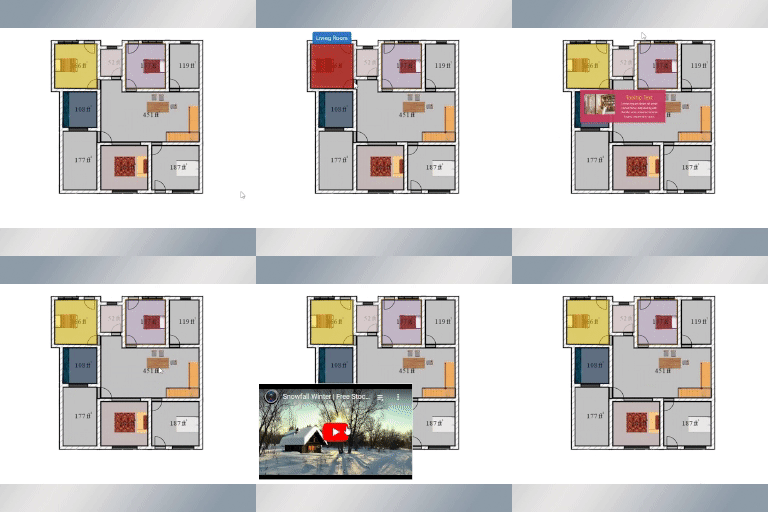
Clickable hotspots can be easily created with this plugin. A great way to display image maps, floor plans, and more.

Interactive Image Map Builder ranks #6,529 among WordPress.org plugins with 1,000+ active installations, a 5/5 rating from 17 reviews, and was last updated Jul 1, 2026. Data from WordPress.org, refreshed twice daily — see methodology.

Tested up to WP 7 (Current: 7.1.1)
v3.2 Current Version v3.2
Updated 2 months ago Last Update on 01 Jul, 2026
Refreshed 9 hours ago Last Refreshed on
Top 10% by installs
View on WordPress.org
Rank
#6,529
+2 this week
Active Installs
1K+
-22.2%
KW Avg Position
3
No change
Downloads
17.2K
+19 today
Support Resolved
0%
No change
Rating
100%
Review 5 out of 5
5 (17 reviews)

Next Milestone 2K

Total Progress 8.1%
1K+ 2K+
6,480
Ranks to Climb
-
Growth Needed
8,000,000
Active Installs
Pro

Unlock Exact Install Count

See the precise estimated active installs for this plugin, calculated from real-time ranking data.

  • Exact install estimates within tiers
  • Track install growth over time
  • Milestone progress predictions
Upgrade to Pro
Need 919 more installs to reach 2K+

Rank Changes

6,524 6,530 6,536 6,542 6,548 11-09-2026 12-09-2026 13-09-2026 14-09-2026 15-09-2026 16-09-2026 17-09-2026 18-09-2026
6,524 6,535 6,545 6,556 6,566 03-09-2026 04-09-2026 05-09-2026 06-09-2026 07-09-2026 08-09-2026 09-09-2026 10-09-2026 11-09-2026 12-09-2026 13-09-2026 14-09-2026 15-09-2026 16-09-2026 17-09-2026 18-09-2026
Current #6,529
Change
Best #

Upgrade to Pro

Unlock 30-day and 90-day rank history charts with a Pro subscription.

Upgrade Now

Active Installs Growth

Active Installs 0,000,000+
Growth +0.0%
Peak 0,000,000

Downloads Growth

10 20 11-09-2026 12-09-2026 13-09-2026 14-09-2026 15-09-2026 16-09-2026 17-09-2026 18-09-2026
0 10 20 03-09-2026 04-09-2026 05-09-2026 06-09-2026 07-09-2026 08-09-2026 09-09-2026 10-09-2026 11-09-2026 12-09-2026 13-09-2026 14-09-2026 15-09-2026 16-09-2026 17-09-2026 18-09-2026
Downloads
Growth
Peak

Upgrade to Pro

Unlock 30-day, 90-day, and yearly download history charts with a Pro subscription.

Upgrade Now

Reviews & Ratings

5.0
17 reviews
Overall 100%
5
17 (100%)
4
0 (0%)
3
0 (0%)
2
0 (0%)
1
0 (0%)

Security History

Source: WPVulnerability

1 known vulnerability on record · 0 in the last 24 months · checked 1 month ago

  1. Interactive Image Map Builder [interactive-image-map-builder] < 1.1

    CVE-2023-25704 · Fixed in v1.1

Track This Plugin

Get detailed analytics, keyword tracking, and position alerts delivered to your inbox.

Start Tracking Free

Plugin Details

Version
3.2
Last Updated
Jul 01, 2026
Requires WP
6.0+
Tested Up To
7
PHP Version
7.0 or higher
Author
Mehjabin Orthi

Support & Rating

Rating
★ ★ ★ ★ ★ 5
Reviews
17
Support Threads
0
Resolved
0%

Keywords

Upgrade to Pro

Unlock keyword rankings, search positions, and detailed analytics with a Pro subscription.

Upgrade Now


TL;DR

AI summary of the plugin's readme

This plugin is for WordPress site owners who want to add clickable hotspots to images, maps, or floor plans without coding. It solves the problem of displaying extra information or links tied to specific regions of an image, letting users view details via tooltips or modals when clicking or hovering.

  • Draggable selected areas
  • Active and hover color options
  • Border, size, and box-shadow styling
  • Edit, undo, clear, delete options
  • Tooltip and modal view modes
  • Built-in and custom templates
  • Embedded map/video code support
  • Custom CSS and unlimited shortcodes

Frequently Asked Questions

Common questions about Interactive Image Map Builder

This Interactive Image Map is the act of adding short explanations or notes to an image or parts of the image. Our plugin has an easy-to-use facility for adding canvas to any images, products, maps, etc. The canvas to literary texts makes them more accessible.
Yes, It’s 100% responsive by resizing images, videos, titles, and descriptions for mobile devices and tablets.
Yes, all common WordPress page builders are supported.
Yes, It supports all popular WordPress themes.
This plugins have a wide range of applications, including displaying similar polling results, marking items and accessories to display information about them, marking or selecting a map region to display information about a specific location, and many more.
Yes, even if custom images or icons can be used for the tooltip content, you can utilize HTML and CSS for your unique template.
There are no restrictions; you can produce as much as you like.
No, by using shortcodes, you can use as much as you like.
It is possible to replace the current styles class with your own CSS values.
In free version, you can add maximum four area/polygon.

Sign In / Register

You need to sign in or register to use this feature.