Language Switcher for Polylang – Elementor, Gutenberg, & Divi
by Cool Plugins 5 (1 reviews)

Language Switcher for Polylang – Elementor, Gutenberg, & Divi

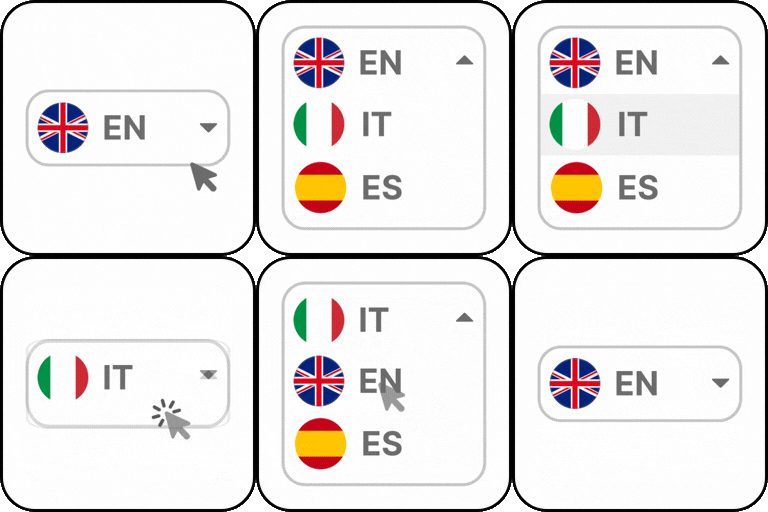
Add a customizable language switcher to Elementor, Gutenberg, and Divi websites, including a floating language switcher for Polylang.

Language Switcher for Polylang ranks #6,864 among WordPress.org plugins with 1,000+ active installations, is #75 of 749 in the Language Tools category, a 5/5 rating from 1 reviews, and was last updated Sep 1, 2026. Data from WordPress.org, refreshed twice daily — see methodology.

Compatible with WP 7.1
v1.1.1 Current Version v1.1.1
Updated 2 weeks ago Last Update on 01 Sep, 2026
Refreshed 6 hours ago Last Refreshed on
#75 of 749 in Language Tools Top 10% by installs Downloads -8.7% this week Actively maintained
View on WordPress.org
Rank
#6,864
No change
Active Installs
1K+
+48.4%
KW Avg Position
40.8
0.2 better
Downloads
2K
+18 today
Support Resolved
0%
No change
Rating
100%
Review 5 out of 5
5 (1 reviews)

Next Milestone 2K

Total Progress 12%
1K+ 2K+
1,724
Ranks to Climb
-
Growth Needed
8,000,000
Active Installs
Pro

Unlock Exact Install Count

See the precise estimated active installs for this plugin, calculated from real-time ranking data.

  • Exact install estimates within tiers
  • Track install growth over time
  • Milestone progress predictions
Upgrade to Pro
Need 880 more installs to reach 2K+

Rank Changes

6,822 6,914 7,006 7,097 7,189 09-09-2026 10-09-2026 11-09-2026 12-09-2026 13-09-2026 14-09-2026 15-09-2026 16-09-2026
6,771 6,972 7,173 7,374 7,575 01-09-2026 02-09-2026 03-09-2026 04-09-2026 05-09-2026 06-09-2026 07-09-2026 08-09-2026 09-09-2026 10-09-2026 11-09-2026 12-09-2026 13-09-2026 14-09-2026 15-09-2026 16-09-2026
Current #6,864
Change
Best #

Upgrade to Pro

Unlock 30-day and 90-day rank history charts with a Pro subscription.

Upgrade Now

Active Installs Growth

Active Installs 0,000,000+
Growth +0.0%
Peak 0,000,000

Downloads Growth

10 20 30 40 50 60 70 80 09-09-2026 10-09-2026 11-09-2026 12-09-2026 13-09-2026 14-09-2026 15-09-2026 16-09-2026
10 20 30 40 50 60 70 80 01-09-2026 02-09-2026 03-09-2026 04-09-2026 05-09-2026 06-09-2026 07-09-2026 08-09-2026 09-09-2026 10-09-2026 11-09-2026 12-09-2026 13-09-2026 14-09-2026 15-09-2026 16-09-2026
Downloads
Growth
Peak

Upgrade to Pro

Unlock 30-day, 90-day, and yearly download history charts with a Pro subscription.

Upgrade Now

Reviews & Ratings

5.0
1 reviews
Overall 100%
5
1 (100%)
4
0 (0%)
3
0 (0%)
2
0 (0%)
1
0 (0%)

Support Threads Overview

Resolved
Unresolved
1
Total Threads
0
Resolved
1
Unresolved
0%
Resolution Rate

Security History

Source: WPVulnerability

No known vulnerabilities on record for Language Switcher for Polylang. Checked 1 month ago.

TL;DR

AI summary of the plugin's readme

This plugin is for WordPress site owners building multilingual websites with the Divi Builder and Polylang. It solves the hassle of manually creating separate menus per language by providing a dedicated, customizable language switcher module inside Divi.

  • Divi Builder module
  • Dropdown, Horizontal & Vertical layouts
  • Language flag display
  • Language name display
  • Language code display
  • Hide current language option
  • Hide untranslated languages option
  • Frontend display preview

Frequently Asked Questions

Common questions about Language Switcher for Polylang – Elementor, Gutenberg, & Divi

Yes. Language Switcher for Polylang is an addon for the Polylang plugin. You must install and activate Polylang before using this plugin.
Yes. The plugin includes a dedicated Elementor Language Switcher widget that you can drag and drop anywhere in your Elementor pages, templates, or headers.
Yes, it works with both. The plugin uses the Elementor widget system, which is available in the free version.
Yes. You can add a Gutenberg Language Switcher block to any page, post, template, or block-based header without using shortcodes or custom code.
Absolutely. The plugin provides a dedicated Divi Language Switcher module that can be added anywhere in your Divi layouts or Theme Builder templates.
No, unlike the default Polylang setup, you don’t need to manually create or assign separate menus for each language. The plugin allows for an easier, automatic solution.
Yes. Simply enable and customize the Floating Language Switcher from the plugin dashboard settings. It will remain visible while visitors browse your website, allowing them to switch languages from any page.
Yes. Using the language switcher for the Polylang plugin you can choose to display language names, country flags, or a combination of both to create a language selector that matches your website's design.
Yes. You can customize colors, typography, spacing, borders, alignment, layouts, and other styling options of your language switcher to match your website.
Yes. Once your languages are configured in Polylang, the plugin automatically detects them and displays them in the language switcher.

Sign In / Register

You need to sign in or register to use this feature.