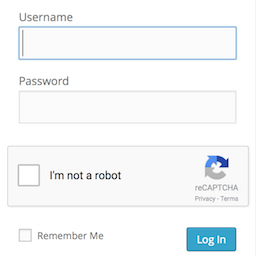
Login No Captcha reCAPTCHA
by Robert Peake 4.5 (63 reviews)

Login No Captcha reCAPTCHA

Adds a Google No Captcha ReCaptcha checkbox to your Wordpress and Woocommerce login, forgot password, and user registration pages.

Login No Captcha reCAPTCHA ranks #690 among WordPress.org plugins with 60,000+ active installations, is #33 of 1,578 in the Authentication category, a 4.5/5 rating from 63 reviews, and was last updated May 26, 2026. Data from WordPress.org, refreshed twice daily — see methodology.

Tested up to WP 7 (Current: 7.1)
v1.8.1 Current Version v1.8.1
Updated 3 months ago Last Update on 26 May, 2026
Refreshed 9 hours ago Last Refreshed on
#33 of 1,578 in Authentication Top 1% by installs Downloads -28.4% this week
View on WordPress.org
Rank
#690
No change
Active Installs
60K+
-1.3%
KW Avg Position
38.3
0.7 better
Downloads
1.4M
+36 today
Support Resolved
0%
No change
Rating
90%
Review 4.5 out of 5
4.5 (63 reviews)

Next Milestone 70K

Total Progress 2.7%
60K+ 70K+
72
Ranks to Climb
-
Growth Needed
8,000,000
Active Installs
Pro

Unlock Exact Install Count

See the precise estimated active installs for this plugin, calculated from real-time ranking data.

  • Exact install estimates within tiers
  • Track install growth over time
  • Milestone progress predictions
Upgrade to Pro
Need 9,730 more installs to reach 70K+

Rank Changes

654 671 689 707 724 10-09-2026 11-09-2026 12-09-2026 13-09-2026 14-09-2026 15-09-2026 16-09-2026 17-09-2026
653 671 689 706 724 02-09-2026 03-09-2026 04-09-2026 05-09-2026 06-09-2026 07-09-2026 08-09-2026 09-09-2026 10-09-2026 11-09-2026 12-09-2026 13-09-2026 14-09-2026 15-09-2026 16-09-2026 17-09-2026
Current #690
Change
Best #

Upgrade to Pro

Unlock 30-day and 90-day rank history charts with a Pro subscription.

Upgrade Now

Active Installs Growth

Active Installs 0,000,000+
Growth +0.0%
Peak 0,000,000

Downloads Growth

0 50 100 150 200 10-09-2026 11-09-2026 12-09-2026 13-09-2026 14-09-2026 15-09-2026 16-09-2026 17-09-2026
0 50 100 150 200 250 02-09-2026 03-09-2026 04-09-2026 05-09-2026 06-09-2026 07-09-2026 08-09-2026 09-09-2026 10-09-2026 11-09-2026 12-09-2026 13-09-2026 14-09-2026 15-09-2026 16-09-2026 17-09-2026
Downloads
Growth
Peak

Upgrade to Pro

Unlock 30-day, 90-day, and yearly download history charts with a Pro subscription.

Upgrade Now

Reviews & Ratings

4.5
63 reviews
Overall 90%
5
51 (81%)
4
2 (3%)
3
3 (5%)
2
2 (3%)
1
5 (8%)

Security History

Source: WPVulnerability

2 known vulnerabilities on record · 1 in the last 24 months · checked 1 week ago

  1. Login No Captcha reCAPTCHA [login-recaptcha] < 1.8.1

    CVE-2026-2374 · Fixed in v1.8.1

  2. Login No Captcha reCAPTCHA [login-recaptcha] < 1.7

    CVE-2022-2913 · Fixed in v1.7

TL;DR

AI summary of the plugin's readme

This plugin is for WordPress and WooCommerce site owners who want to protect login, registration, and password recovery pages from bots. It adds a Google No Captcha reCAPTCHA checkbox to these forms, blocking automated scripts while remaining easy for humans to complete.

  • No Captcha reCAPTCHA checkbox
  • WooCommerce login integration
  • Forgot password page protection
  • User registration page protection
  • Blocks automated scripts

Frequently Asked Questions

Common questions about Login No Captcha reCAPTCHA

Many Worpdress sites are bombarded by automated scripts trying to log in to the admin over and over. The No Captcha is a very simple, Google-supported test to quickly deny access to automated scripts. It is great by itself to instantly make your Wordpress site more secure, or can be used with other plugins (like Google Authenticator, Limit Login Attempts, etc.) as part of a defense-in-depth strategy.
I've gone to great lengths to try to make sure this plugin is easy to use and install, that it is compatible with different Wordpress configurations, supports multiple languages, and that you won't accidentally lock yourself out of the admin by using it. I use it myself on my own sites as well. So far, it just works.
Probably not. Many custom login form plugins do not call the standard login_form action hook from their login forms, making it impossible to correctly render the captcha after the password prompt. For this reason, this plugin only supports the default wp-login.php and WooCommerce forms. Many such plugins do offer captcha fields (sometimes as a paid upgrade). This plugin tries to do just a few things well.
No. This plugin is designed to thwart automated hacking attempts, not prevent comment spam. Most good comment plugins have their own spam prevention methods. This plugin tries to do just a few things well.
No. This plugin is designed to thwart automated hacking attempts, not prevent spam from custom forms. Most good custom form plugins have their own spam prevention methods. Many of them support a CAPTCHA field already. This plugin tries to do just a few things well.
Yes, please. Submit pull requests on github. I am having trouble with the reCAPTCHA in Internet Explorer Please see this page for help from Google.
No. This plugin protects the standard WordPress login form at wp-login.php and WooCommerce login, registration, and lost password forms. Authentication requests made via XML-RPC (xmlrpc.php) or the WordPress REST API do not pass through the login form and therefore bypass reCAPTCHA entirely. If you are concerned about brute-force attacks via these endpoints, you should disable XML-RPC if you do not use it (many security plugins offer this) and ensure the REST API authentication endpoints are protected separately. This plugin tries to do just a few things well. I still see lots of brute force attacks against /wp-login.php in my log files The reCAPTCHA plugin will not prevent the attempt of brute force attacks, rather it will simply ensure that they do not succeed. That is, scripts may still attempt direct POST attacks against /wp-login.php, but without the correct reCAPTCHA data, they will not go through (even if they have guessed the login and password correctly). To prevent repeat attempts against /wp-login.php, consider using a plugin that limits login attempts in conjunction with this one. Other approaches, such as a web application firewall should also form a part of your complete defense-in-depth strategy.
https://www.google.com/recaptcha/intro/index.html
This plugin is not affiliated with or endorsed by Google in any way. Google is a registered trademark of Google, Inc. By using reCAPTCHA you agree the terms of service set out by Google. The author provides no warranty as to the suitability to any purpose of this software. You agree to use it entirely at your own risk.

Sign In / Register

You need to sign in or register to use this feature.