Modern Footnotes
by prismtechstudios 4.8 (32 reviews)

Modern Footnotes

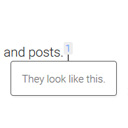
Add inline footnotes to your posts. On desktop, the footnotes will appear as tooltips. On mobile, the footnote will expand beneath the text.

Modern Footnotes ranks #2,902 among WordPress.org plugins with 6,000+ active installations, a 4.8/5 rating from 32 reviews, and was last updated Aug 24, 2026. Data from WordPress.org, refreshed twice daily — see methodology.

Compatible with WP 7.1
v1.5.1 Current Version v1.5.1
Updated 2 months ago Last Update on 24 Aug, 2026
Refreshed 1 week ago Last Refreshed on
Top 5% by installs Downloads +11.9% this week
View on WordPress.org
Rank
#2,902
— No change
Active Installs
6K+
-7.1%
KW Avg Position
1
— No change
Downloads
112.8K
+15 today
Support Resolved
0%
— No change
Rating
96%
Review 4.8 out of 5
4.8 (32 reviews)

Next Milestone 7K

Total Progress 31.9%
6K+ 7K+
362
Ranks to Climb
-
Growth Needed
8,000,000
Active Installs
Pro

Unlock Exact Install Count

See the precise estimated active installs for this plugin, calculated from real-time ranking data.

  • Exact install estimates within tiers
  • Track install growth over time
  • Milestone progress predictions
Upgrade to Pro
Need 681 more installs to reach 7K+

Rank Changes

2,757 2,829 2,902 2,975 3,047 31-10-2026 01-11-2026 02-11-2026 03-11-2026 04-11-2026 05-11-2026 06-11-2026 07-11-2026
2,757 2,831 2,906 2,981 3,055 23-10-2026 24-10-2026 25-10-2026 26-10-2026 27-10-2026 28-10-2026 29-10-2026 30-10-2026 31-10-2026 01-11-2026 02-11-2026 03-11-2026 04-11-2026 05-11-2026 06-11-2026 07-11-2026
Current #2,902
Change
Best #

Upgrade to Pro

Unlock 30-day and 90-day rank history charts with a Pro subscription.

Upgrade Now

Active Installs Growth

Active Installs 0,000,000+
Growth +0.0%
Peak 0,000,000

Downloads Growth

0 50 100 150 31-10-2026 01-11-2026 02-11-2026 03-11-2026 04-11-2026 05-11-2026 06-11-2026 07-11-2026
0 50 100 150 23-10-2026 24-10-2026 25-10-2026 26-10-2026 27-10-2026 28-10-2026 29-10-2026 30-10-2026 31-10-2026 01-11-2026 02-11-2026 03-11-2026 04-11-2026 05-11-2026 06-11-2026 07-11-2026
Downloads
Growth
Peak

Upgrade to Pro

Unlock 30-day, 90-day, and yearly download history charts with a Pro subscription.

Upgrade Now

Reviews & Ratings

4.8
32 reviews
Overall 96%
5
29 (91%)
4
1 (3%)
3
0 (0%)
2
2 (6%)
1
0 (0%)

Support Threads Overview

Resolved
Unresolved
1
Total Threads
0
Resolved
1
Unresolved
0%
Resolution Rate

Security History

Source: WPVulnerability

4 known vulnerabilities on record · 1 in the last 24 months · checked 1 month ago

  1. Modern Footnotes [modern-footnotes] < 1.4.20

    CVE-2025-50049 · Fixed in v1.4.20

  2. Modern Footnotes [modern-footnotes] < 1.4.17

    CVE-2023-5618 · Fixed in v1.4.17

  3. Modern Footnotes [modern-footnotes] < 1.4.16

    CVE-2023-28423 · Fixed in v1.4.16

  4. Modern Footnotes [modern-footnotes] < 1.4.16

    CVE-2023-28423 · Fixed in v1.4.16

Track This Plugin

Get detailed analytics, keyword tracking, and position alerts delivered to your inbox.

Start Tracking Free

Plugin Details

Version
1.5.1
Last Updated
Aug 24, 2026
Requires WP
4.6+
Tested Up To
7.1
PHP Version
N/A

Support & Rating

Rating
★ ★ ★ ★ ★ 4.8
Reviews
32
Support Threads
1
Resolved
0%

Keywords

Upgrade to Pro

Unlock keyword rankings, search positions, and detailed analytics with a Pro subscription.

Upgrade Now

TL;DR

AI summary of the plugin's readme

This plugin is for WordPress bloggers and writers who want to add footnotes to their posts. It solves the problem of displaying footnotes cleanly by showing them as tooltips on desktop and expandable sections on mobile.

  • Inline footnote shortcode
  • Automatic sequential numbering
  • Footnote list shortcode
  • Custom reference number option
  • Custom CSS class option
  • Footnote counter reset option
  • Editor footnote icon
  • Desktop tooltip display

Frequently Asked Questions

Common questions about Modern Footnotes

Use a footnote in your post by using the footnote icon in the WordPress editor or by using the shortcode: [mfn]this will be a footnote[/mfn]
Yes. Go to Settings -> Modern Footnotes and choose the "Display footnote list at bottom of posts" option. Or, if you only want the footnotes at the bottom of the post when printing, choose the "When printing, list footnotes at the bottom of posts" option.
Yes. Go to Settings -> Modern Footnotes and choose the "Expandable footnotes on desktop" option.
Yes. You can specify custom reference numbers by using the "referencenumber" attribute to specify a particular reference number. For example: [mfn referencenumber=3]This will have the number 3 with it.[/mfn]
Yes. Designate the footnote where you want numbers to reset with the referencereset='true' attribute and the reference counter will restart at 1. For example: [mfn referencereset='true']This will have the number 1 with it, regardless of how many footnotes came before it. The next footnote after this will be the number 2.[/mfn] Please note that this may not be compatible with all other plugins depending on how the plugin manipulates the HTML, so if the numbers aren't appearing right, you may have to use the "refnum" attribute instead (see "Can I customize the reference numbers output by the plugin?")
If you want to customize the styles, you can do so by overriding the following styles in custom CSS for your theme: .modern-footnotes-footnote - The superscript element displaying the footnote number .modern-footnotes-footnote--selected - A superscript element that is currently active .modern-footnotes-footnote__note – Styling that applies to both mobile and desktop footnotes .modern-footnotes-footnote__note--mobile - The styling for a mobile footnote .modern-footnotes-footnote__note--desktop - The styling for a desktop footnote Furthermore, if you want to apply different styles to different footnotes, you can add additional classes to each individual footnote by using the class option in the shortcode like this: [mfn class="my-pretty-class"] [/mfn]
Yes. You can use the Modern Footnotes button in the toolbar of the Block Editor to move the selected text into a footnote. However, if you want to customize the reference numbers output by the plugin, you'll have to type out the shortcode instead.
The word "footnote" only shows up by the first footnote in each paragraph in the editor, but all footnotes are highlighted gray. This is to work around a technical limitation of Gutenberg's editor, though hopefully we can come up with a better solution in the future. Don't worry, your footnotes will show up correctly when viewing the page/blog post though!
Modern Footnotes is an open source project built with its contributors' free time. Any gestures of support are quite meaningful. You can support the plugin by leaving a positive review or buying a coffee for the developer. And, if you would like to help develop the plugin, we deeply appreciate any contributions to the project on GitHub.

Sign In / Register

You need to sign in or register to use this feature.