by Nomad World Map
4.7 (50 reviews)
Nomad World Map
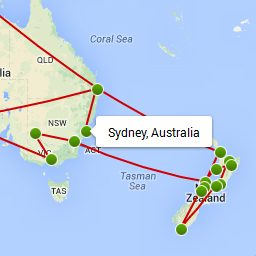
Create your own custom travel map. Link locations on the map to blog posts and share your travel plans.
Tested up to WP 4.6 (Current: 6.9)
v1.3.1
Current Version v1.3.1
Updated 9 years ago
Last Update on 30 Aug, 2016
Synced 7 hours ago
Last Synced on
Rank
#7,911
-1 this week
Active Installs
800+
-4.4%
KW Avg Position
63
-0.3 better
Downloads
40.6K
+4 today
Support Resolved
0%
—
No change
Rating
94%
Review 4.7 out of 5
4.7
(50 reviews)
Next Milestone 900
800+
900+
271
Ranks to Climb
-
Growth Needed
8,000,000
Active Installs
Pro
Unlock Exact Install Count
See the precise estimated active installs for this plugin, calculated from real-time ranking data.
- Exact install estimates within tiers
- Track install growth over time
- Milestone progress predictions
Need 77 more installs to reach 900+
Rank Changes
Current
#7,911
Change
Best
#
Downloads Growth
Downloads
Growth
Peak
Upgrade to Pro
Unlock 30-day, 90-day, and yearly download history charts with a Pro subscription.
Upgrade NowReviews & Ratings
4.7
50 reviews
Overall
94%
5
46
(92%)
4
0
(0%)
3
0
(0%)
2
1
(2%)
1
3
(6%)
Tracked Keywords
Showing 4 of 4| Keyword | Position | Change | Type | Updated |
|---|---|---|---|---|
| Trip | 24 | — | Tag | 7 hours ago |
| travel blog | 43 | — | Tag | 7 hours ago |
| route | 83 | — | Tag | 7 hours ago |
| travel | 102 | — | Tag | 7 hours ago |
Unlock Keyword Analytics
Track keyword rankings, search positions, and discover new ranking opportunities with a Pro subscription.
- Full keyword position tracking
- Historical ranking data
- Competitor keyword analysis
Track This Plugin
Get detailed analytics, keyword tracking, and position alerts delivered to your inbox.
Start Tracking FreePlugin Details
- Version
- 1.3.1
- Last Updated
- Aug 30, 2016
- Requires WP
- 3.5+
- Tested Up To
- 4.6
- PHP Version
- N/A
- Author
- Nomad World Map
Support & Rating
- Rating
- ★ ★ ★ ★ ★ 4.7
- Reviews
- 50
- Support Threads
- 0
- Resolved
- 0%
Keywords
Upgrade to Pro
Unlock keyword rankings, search positions, and detailed analytics with a Pro subscription.
Upgrade NowSimilar Plugins

WP Adminify – White Label WordPress, Admin Menu Editor, Login Customizer
7K+ installs
#2,736
Master Addons For Elementor – White Label, Free Widgets, Hover Effects, Conditions, & Animations
40K+ installs
#929
GiveWP – Donation Plugin and Fundraising Platform
100K+ installs
#351
TermsFeed AutoTerms: Privacy Policy Generator, Cookie Consent, GDPR, CCPA, Terms & Conditions, Disclaimers, Cookies Policy, EULA
90K+ installs
#493
Event Tickets and Registration
90K+ installs
#498
Frequently Asked Questions
Common questions about Nomad World Map

Add this shortcode [nwm_map] to the page where you want to display the map.
You add the shortcode like you normally would, only this time you also need to define the map ID. So if you want to show the maps with ids 1,4 and 5 you would add the following shortcodes. [nwm_map id="1"] [nwm_map id="4"] [nwm_map id="5"]
Yes, just add the width and height as an attribute to the shortcode. [nwm_map height="500" width="500"]
You can add the id attribute to the [nwm_map id="3"] shortcode. This will show the map with ID 3 on your page.
Make sure your theme doesn't use AJAX to navigate between pages, if so try to disable it. Also make sure there are no JavaScript errors on your site. Last thing you can try is to switch to another theme and disable other plugins and see if that fixes it.
You can set the zoom level like this. [nwm_map zoom="6"] You can set the content type to either 'tooltip' or 'slider'. [nwm_map content="tooltip"] If it's set to tooltip, it will remove the slider. You can disable the lines between the markers [nwm_map lines="0"] You can set the map type like this [nwm_map maptype="roadmap"] other accepted values are 'satellite', 'hybrid' and 'terrain'. If the zoom level, content type, lines or maptype are not set in the shortcode, the values from the general settings page will be used.
Yes, this short code [nwm_list id="1"] will show the destination list for the map with id 1. If no id is set, it will default to 1. Other shortcode options for the list: [nwm_list id="1" dates="all"] Show both the arrival and departure dates [nwm_list id="1" dates="arrival"] Only show the arrival dates [nwm_list id="1" dates="departure"] Only show the arrival dates [nwm_list order="asc"] or `[nwm_list order="desc]` will change the sort order of the destination list
Make sure the blog post you search for is published, and that it matches exactly with the title you see in the blog post editor. Otherwise please open a support request in the support form.