
Product Variation Swatches for WooCommerce – Smart Swatches
by ShapedPlugin LLC 5 (9 reviews)

Product Variation Swatches for WooCommerce – Smart Swatches

Create beautiful color, image & button variation swatches that boost your store's appeal and help customers select variations with ease.

Compatible with WP 7.0.2
v1.0.11 Current Version v1.0.11
Updated 2 weeks ago Last Update on 03 Jul, 2026
Refreshed 6 hours ago Last Refreshed on
View on WordPress.org
Rank
#7,582
No change
Active Installs
800+
-8%
KW Avg Position
11
No change
Downloads
9.8K
+8 today
Support Resolved
0%
No change
Rating
100%
Review 5 out of 5
5 (9 reviews)

Next Milestone 900

Total Progress 67%
800+ 900+
182
Ranks to Climb
-
Growth Needed
8,000,000
Active Installs
Pro

Unlock Exact Install Count

See the precise estimated active installs for this plugin, calculated from real-time ranking data.

  • Exact install estimates within tiers
  • Track install growth over time
  • Milestone progress predictions
Upgrade to Pro
Need 33 more installs to reach 900+

Rank Changes

7,560 7,566 7,572 7,578 7,584 12-07-2026 13-07-2026 14-07-2026 15-07-2026 16-07-2026 17-07-2026 18-07-2026 19-07-2026
7,560 7,566 7,572 7,578 7,584 04-07-2026 05-07-2026 06-07-2026 07-07-2026 08-07-2026 09-07-2026 10-07-2026 11-07-2026 12-07-2026 13-07-2026 14-07-2026 15-07-2026 16-07-2026 17-07-2026 18-07-2026 19-07-2026
7,560 7,566 7,572 7,578 7,584 19-06-2026 20-06-2026 21-06-2026 22-06-2026 23-06-2026 24-06-2026 25-06-2026 26-06-2026 27-06-2026 28-06-2026 29-06-2026 30-06-2026 01-07-2026 02-07-2026 03-07-2026 04-07-2026 05-07-2026 06-07-2026 07-07-2026 08-07-2026 09-07-2026 10-07-2026 11-07-2026 12-07-2026 13-07-2026 14-07-2026 15-07-2026 16-07-2026 17-07-2026 18-07-2026 19-07-2026
7,560 7,566 7,572 7,578 7,584 20-04-2026 21-04-2026 22-04-2026 23-04-2026 24-04-2026 25-04-2026 26-04-2026 27-04-2026 28-04-2026 29-04-2026 30-04-2026 01-05-2026 02-05-2026 03-05-2026 04-05-2026 05-05-2026 06-05-2026 07-05-2026 08-05-2026 09-05-2026 10-05-2026 11-05-2026 12-05-2026 13-05-2026 14-05-2026 15-05-2026 16-05-2026 17-05-2026 18-05-2026 19-05-2026 20-05-2026 21-05-2026 22-05-2026 23-05-2026 24-05-2026 25-05-2026 26-05-2026 27-05-2026 28-05-2026 29-05-2026 30-05-2026 31-05-2026 01-06-2026 02-06-2026 03-06-2026 04-06-2026 05-06-2026 06-06-2026 07-06-2026 08-06-2026 09-06-2026 10-06-2026 11-06-2026 12-06-2026 13-06-2026 14-06-2026 15-06-2026 16-06-2026 17-06-2026 18-06-2026 19-06-2026 20-06-2026 21-06-2026 22-06-2026 23-06-2026 24-06-2026 25-06-2026 26-06-2026 27-06-2026 28-06-2026 29-06-2026 30-06-2026 01-07-2026 02-07-2026 03-07-2026 04-07-2026 05-07-2026 06-07-2026 07-07-2026 08-07-2026 09-07-2026 10-07-2026 11-07-2026 12-07-2026 13-07-2026 14-07-2026 15-07-2026 16-07-2026 17-07-2026 18-07-2026 19-07-2026
Current #7,582
Change
Best #

Upgrade to Pro

Unlock 30-day and 90-day rank history charts with a Pro subscription.

Upgrade Now

Active Installs Growth

Active Installs 0,000,000+
Growth +0.0%
Peak 0,000,000

Downloads Growth

0 10 20 30 12-07-2026 13-07-2026 14-07-2026 15-07-2026 16-07-2026 17-07-2026 18-07-2026 19-07-2026
0 50 100 150 200 250 04-07-2026 05-07-2026 06-07-2026 07-07-2026 08-07-2026 09-07-2026 10-07-2026 11-07-2026 12-07-2026 13-07-2026 14-07-2026 15-07-2026 16-07-2026 17-07-2026 18-07-2026 19-07-2026
0 50 100 150 200 250 19-06-2026 20-06-2026 21-06-2026 22-06-2026 23-06-2026 24-06-2026 25-06-2026 26-06-2026 27-06-2026 28-06-2026 29-06-2026 30-06-2026 01-07-2026 02-07-2026 03-07-2026 04-07-2026 05-07-2026 06-07-2026 07-07-2026 08-07-2026 09-07-2026 10-07-2026 11-07-2026 12-07-2026 13-07-2026 14-07-2026 15-07-2026 16-07-2026 17-07-2026 18-07-2026 19-07-2026
0 50 100 150 200 250 20-04-2026 23-04-2026 26-04-2026 29-04-2026 02-05-2026 05-05-2026 08-05-2026 11-05-2026 14-05-2026 17-05-2026 20-05-2026 23-05-2026 26-05-2026 29-05-2026 01-06-2026 04-06-2026 07-06-2026 10-06-2026 13-06-2026 16-06-2026 19-06-2026 22-06-2026 25-06-2026 28-06-2026 01-07-2026 04-07-2026 07-07-2026 10-07-2026 13-07-2026 16-07-2026 19-07-2026
0 50 100 150 200 250 300 19-07-2025 31-07-2025 12-08-2025 24-08-2025 05-09-2025 17-09-2025 29-09-2025 11-10-2025 23-10-2025 04-11-2025 16-11-2025 28-11-2025 10-12-2025 22-12-2025 03-01-2026 15-01-2026 27-01-2026 08-02-2026 20-02-2026 04-03-2026 16-03-2026 28-03-2026 09-04-2026 21-04-2026 03-05-2026 15-05-2026 27-05-2026 08-06-2026 20-06-2026 02-07-2026 14-07-2026 19-07-2026
Downloads
Growth
Peak

Upgrade to Pro

Unlock 30-day, 90-day, and yearly download history charts with a Pro subscription.

Upgrade Now

Reviews & Ratings

5.0
9 reviews
Overall 100%
5
9 (100%)
4
0 (0%)
3
0 (0%)
2
0 (0%)
1
0 (0%)

Tracked Keywords

Showing 5 of 5
Keyword Position Change Type Updated
color swatches 9 Tag 2 days ago
product swatches 10 Tag 2 days ago
variation swatches 11 Tag 2 days ago
woocommerce swatches 12 Tag 2 days ago
woocommerce variation swatches 13 Tag 2 days ago

Unlock Keyword Analytics

Track keyword rankings, search positions, and discover new ranking opportunities with a Pro subscription.

  • Full keyword position tracking
  • Historical ranking data
  • Competitor keyword analysis
Upgrade to Pro

Track This Plugin

Get detailed analytics, keyword tracking, and position alerts delivered to your inbox.

Start Tracking Free

Plugin Details

Version
1.0.11
Last Updated
Jul 03, 2026
Requires WP
5.3+
Tested Up To
7.0.2
PHP Version
N/A

Support & Rating

Rating
★ ★ ★ ★ ★ 5
Reviews
9
Support Threads
0
Resolved
0%

Keywords

Upgrade to Pro

Unlock keyword rankings, search positions, and detailed analytics with a Pro subscription.

Upgrade Now


Frequently Asked Questions

Common questions about Product Variation Swatches for WooCommerce – Smart Swatches
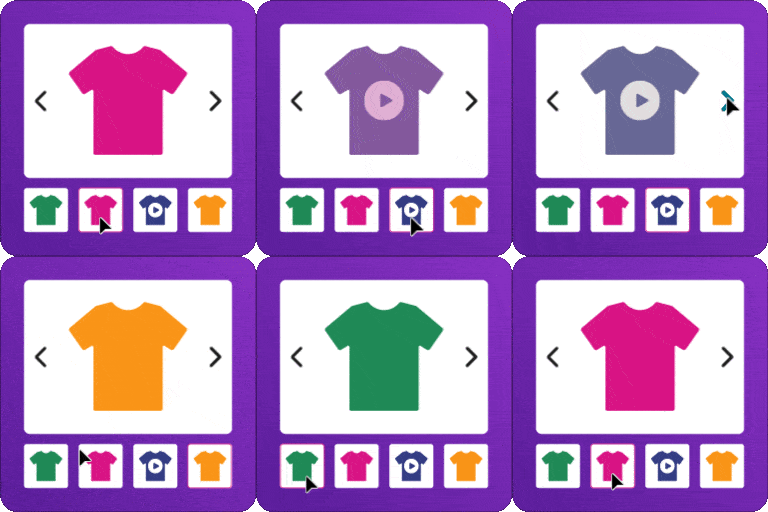
Install and activate Smart Swatches, then go to the plugin settings. It automatically detects your variable products and lets you convert their dropdown attributes into color swatches, image swatches, or button swatches. You can also assign colors and images to each attribute term from the Attributes screen. No coding is required.
Smart Swatches automatically converts your default WooCommerce variation dropdowns into clickable swatches. Just enable the auto-convert option and your dropdown attributes turn into buttons (or images in the Pro version) across your store, with your consent — no need to edit templates or remove the dropdown manually.
Yes. Smart Swatches lets you display swatches on the shop page, category pages, and product archive pages, not just the product detail page. You can show all attributes or only the most important one (like color), and even style the shop-page swatches differently from the product-page swatches.
You can create color swatches, image swatches, and button/label swatches in the free version. The Pro version adds image-and-text swatches and radio button swatches. This covers single-color, dual-color, and multi-color products, as well as text-based options like size, storage, and flavor.
Yes, Smart Swatches has a free version that includes color, image, and button swatches, automatic dropdown conversion, shop-page display, multiple shapes, and tooltips. A Pro version unlocks advanced features like swatch sliders, mouseover activation, swatch filters, variation stock info, and shareable variation links.
Smart Swatches is built to work with standard WooCommerce themes. If your theme already styles variations heavily, you can enable "Disable Plugin Default Stylesheet" to rely on your theme's styling or your own custom CSS, so the swatches blend in seamlessly.
Yes. With swatches displayed on shop and archive pages, customers can choose a color, size, or style and add variable products to the cart directly from the product grid — saving them time and helping you grow sales.
Yes. Smart Swatches is compatible with popular quick view plugins, so your swatches appear inside the quick view popup. Customers can pick the perfect color, size, and more without leaving the shop page.
Yes. Like Amazon and AliExpress, the product gallery updates to show the main and additional images and videos of a variation as soon as a shopper selects a single swatch — no need to choose every attribute first.
Yes. You can add text tooltips to all or specific attributes and display them on shop pages, product pages, or both. You control the position (top, bottom, left, right), effects, color, size, and width. The Pro version also supports image tooltips with a live hover preview.

Sign In / Register

You need to sign in or register to use this feature.